
Information For Clients
jump to section:
How to save money on your taxes
Steps in tax preparation with Gingersnap Tax
What documents do I need to provide for different tax returns?
How to save money on taxes
Click on the topics below to see more information
This is by far the most popular question asked by taxpayers: “How can I pay less in tax?” with a variation also being “How can I have a bigger refund?” The answer in both cases depends on the level of financial planning you want to engage in.
By the time we are working on the tax return, the tax year has already happened. Many strategies to lower tax and taxable income need to be put into action during the tax year in question.
Everyone has access to tools and strategies that can lower their tax bill legally. As you become more aware of the details in tax laws, you will also become better at planning ahead to offset your annual tax burden.
Perhaps the best first step to streamline taxes is to make an “annual financial plan.”
Here are five additional beginning strategies to lower taxes that many people can take advantage of with a small amount of planning (each is subject to restrictions and rules):
1. Maximize your retirement contributions
Maximizing your retirement contributions each year lowers taxable income and allows you to retain that money in retirement accounts that can earn interest and investment earnings over time. Employer-based 401K plans, in particular, can offset a sizable amount of income and employer matching funds that would otherwise be taxable. Even if you don’t have access to an employer-sponsored retirement plan, Individual Retirement Accounts (IRAs) can also yield savings in tax. You generally have until April 15 of the following year to complete your voluntary IRA contributions, allowing you to use this as a tool to fine tune your tax return results. Fun fact – you can invest in an IRA in addition to having 401K contributions (see guidelines).
Also, note that Roth accounts are funded from after-tax dollars and won’t yield a tax savings in the current year. Instead, Roth account principal and earnings (401K and IRAs) will be tax-free for qualified distributions in the future. Qualified distributions mean the account is at least five years old (the 5-year rule) AND the owner is age 59½ or older, disabled, or using the funds for a first-time home purchase ($10,000 limit). Roth contributions can always be withdrawn tax-free, but earnings are taxed if the requirements are not met.
2. Open a health savings account (HSA)
If you are in the situation of being able to get by with health insurance with higher deductibles, Health Savings Accounts (HSA) can also be useful. These plans are allowed when you have health insurance with high deductibles. Many employers are offering these as workplace plans and also may contribute toward your HSA account. Starting Jan. 1, 2026, all ACA marketplace health insurance plans at the bronze level qualify for an HSA. HSA contributions will decrease taxable income (payroll) and additional non-payroll contributions can decrease AGI on the tax return.
3. Use tax loss harvesting to offset capital gains from brokerage accounts
If you have money invested in the stock market, you know that when you sell stock at a profit, it is going to be subject to capital gains tax. You can also choose to sell investments that aren’t doing as well in the market at a loss. These losses are allowed to offset up to 100% of gains or if the losses exceed gains, you are allowed to take up to a $3,000 loss on your tax return each year. Higher losses may be carried over indefinitely for use in later years.
4. Fine tune federal and state tax withholding from your W2 job or make sure estimated payments are coming close to actual targets
It is important to fine tune payroll tax deductions or estimated tax payments so that you aren’t contributing too much tax ahead of time. Contributing too much during the year can result in a large tax refund, but it means the government has had your money during the time when you could have also used it to fund an investment or earn interest. Withholdings on deposit equal to 100% of last year’s tax, or 90% of current year tax , will keep you from having a 2210 penalty (not enough withholding). In a W2 job, review your W4 information annually. If self-employed, or retired, be sure to get an accurate estimated tax plan. Your accountant or payroll specialist can assist.
5. Use QCD’s to offset RMD’s without adding a tax burden
If you are age 70 1/2 or older, and subject to required minimum distributions (RMD’s) from retirement accounts, you can use qualified charitable distributions paid directly from the account to the charity to take care of RMD’s without causing taxable income. Payments have to be made directly by the institution to the charity and cannot be received directly by the taxpayer. The resulting charitable contribution is not tax-deductible on your tax return, but it avoids additional tax on retirement money received during the year.
Steps in tax preparation with Gingersnap Tax
Click on the topics below to see more information
1. Schedule a meeting to go over your tax return needs
Use the button above to schedule a video conference call for us to meet, get to know each other, and review your tax return needs. If everything seems agreeable to move ahead, you will receive access credentials for the client portal.
2. Sign the client engagement agreement, fill out profile and organizer in the portal, and upload your tax documentation
You will receive an email inviting you to sign the client engagement agreement.
When you log into the client portal, you will set up your Profile information. Uploaded tax documents will show up in the Files section. The tax organizer will show up as a file shared with you in the files list.
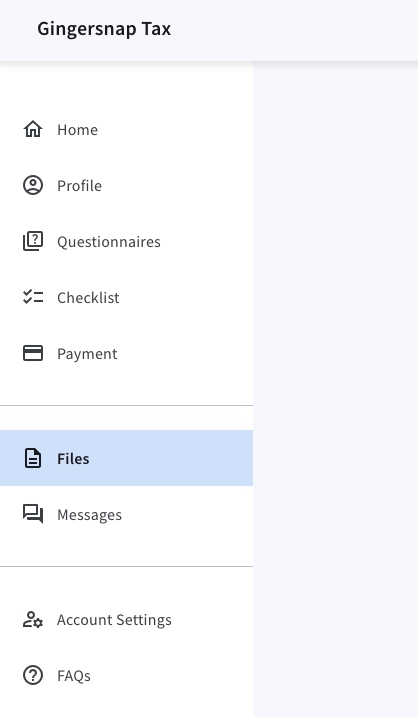
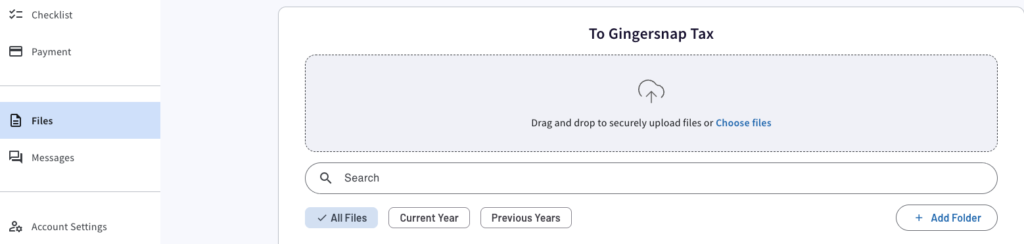
Use the upload button to provide copies of your tax documents to be used in the tax preparation process (pdf or jpg).
3. Stay in touch while the tax return is being prepared
The client portal includes a secure messaging app that allows us to send messages and keep in touch. Once the client engagement agreement is signed and the tax organizer is completed, I will use the documents you provide to complete the tax return for you. If I have any questions, I will reach out to you using the messaging app. If documents are missing, we will keep in touch via the messaging app until they become available.
4. Review and sign the tax return
I will send a message when the tax return is complete and ready for review and signature. If you indicated in the tax organizer that you want to review options for retirement or HSA contributions before signing, I will send a meeting invite to go over details. The electronic signature process uses KBA identification questions to validate identity. The system will send me a message when the documents are signed and ready for transmission.
5. Your signed tax return is transmitted to the IRS, confirmation of acceptance is available in the portal
The tax return and signatures will be reviewed one last time before transmitting. Once sent, acceptance generally goes pretty fast. We will generally know within 24-48 hours that the returns were accepted. If the returns are rejected for some reason, you will receive a message via the secure messaging app to update you on the status and request additional information or help address the issues.
FAQ’s
Click on the topics below to see more information
While using the client portal, all client documents are encrypted during transfer and at rest.
The portal environment is designed to comply with IRS security requirements, including protecting Personally Identifiable Information (PII) and enabling Multi-Factor Authentication (MFA).
It supports secure document exchange, Knowledge-Based Authentication (KBA) for remote signatures, and aligns with IRS Security Summit initiatives and FTC GLBA requirements.
Messaging within the portal is encrypted.
Your contact information will not be shared or sold.
Download Form 4868 from the IRS site and print out page 1 to enter your name, social security number, and address information.
You can mail a payment with your form, but you are not required to.
Use the mailing instructions on page 4.
It is recommended to mail any items to the IRS using certified mail or other method with proof of receipt. The request must be postmarked by April 15 for form 1040.
When your tax return or other document is ready for signature, you will receive an email with a link to access the signature process.
1. Click the link in the email and log in to be redirected to the Signatures page of your account (this part of the account is not visible if you log in directly through the portal)
2. Click the document to sign. If this is your first time signing a document, you must verify your identity by correctly answering several questions. Per IRS requirements, if you do not answer three out of four questions correctly, you cannot electronically sign documents for the remainder of the calendar year.
3. The document is opened. Click the highlighted signature box and record your signature. Apply your signature when finished.
4. When you have completed all signature fields, Submit the document. The document disappears from the Signatures page and your preparer is notified that you have completed the document.
Log into your portal account and choose “Files” from the left menu.
On the right-hand side of the file you want to download, click the three dots. Choose “download.”
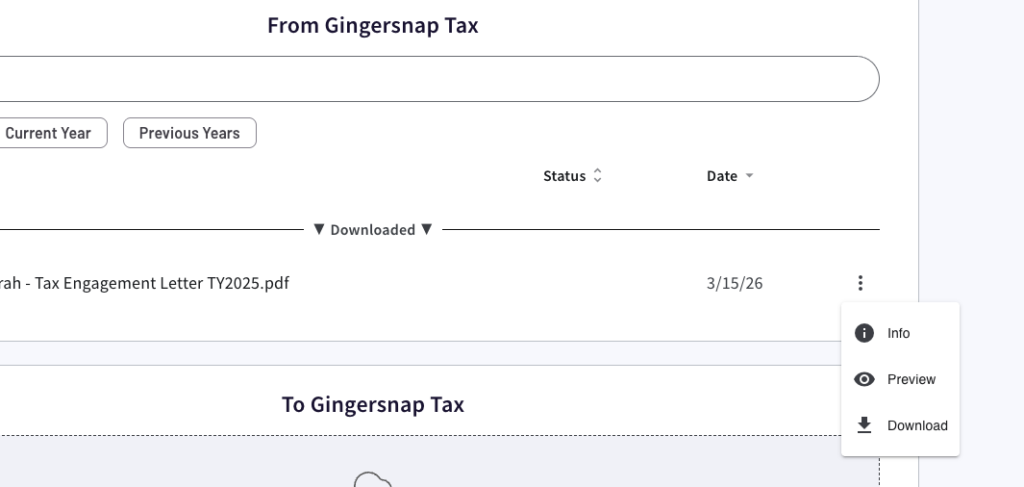
The file will download to your local downloads folder.
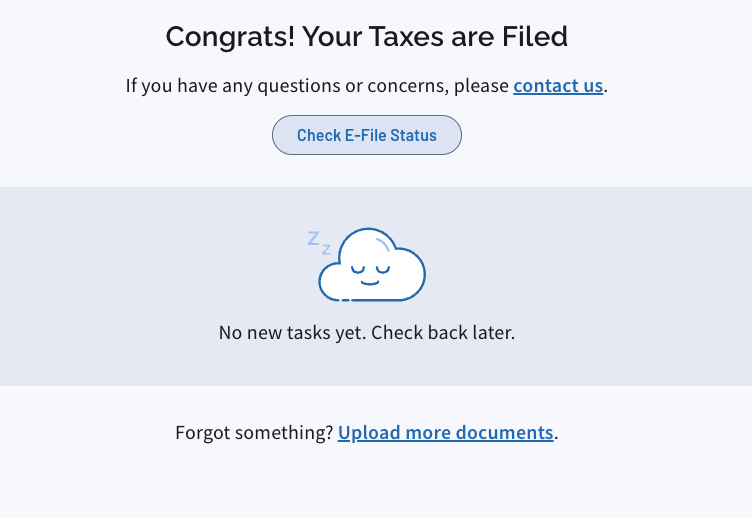
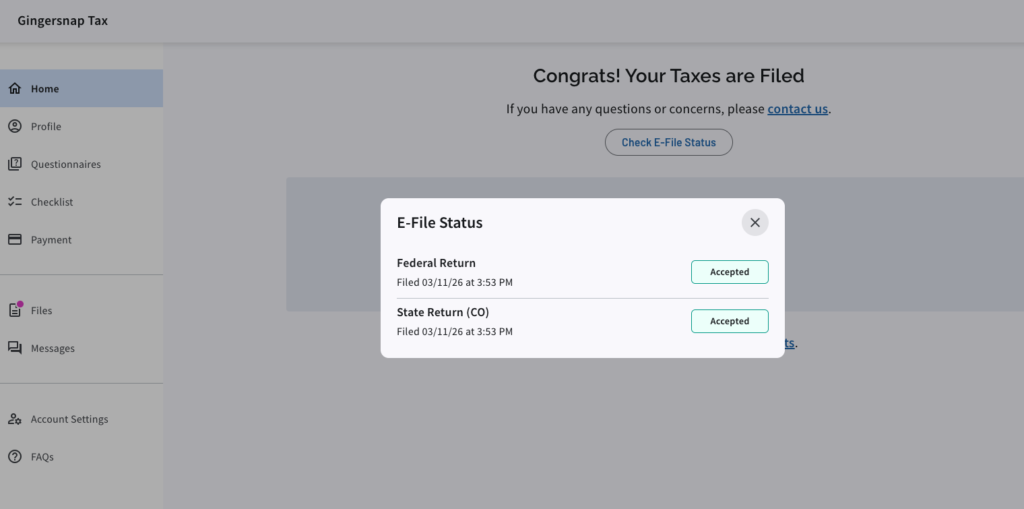
Log into your portal account. In the Home area that opens, you will see a button to check E-file status.
Click the button to check e-file status and the current status information will show.
What documents do I need to provide for different tax returns?
After your tax return call, you will receive a customized list of needed documents in the tax portal.
All tax returns require identification for the people named as well as a copy of the prior year tax return to get started.
Other financial documents are also needed. You will upload your documents by logging into the client portal and using the secure upload link (do not email).
Click on the tax return types below to see a list of common items that may or may not be needed for your specific return. If you do have any of these types of accounts or deductions, these documents are needed to ensure the right information is reported on your tax return.
- Scan of ID card(s) for self and spouse
- Proof of current address
- Prior year 1040 tax return
- 1040 organizer
- W-2’s
- 1099-NEC — non-employee compensation statement
- 1099-INT — annual interest statement
- 1098-MIS — mortgage information statement
- Receipt for state property taxes (if paid separately)
- 1099-R — retirement distributions
- 1099-SSA — social security statement
- 1099-SA — health savings account distribution
- 5498-SA — health savings account annual statement
- 1099-B or 1099-Comprehensive — brokerage annual statement
- 1095-A — marketplace health insurance annual summary
- 1095-B or 1095-C employer health insurance annual summary (for states with a health insurance mandate)
- Receipts for charitable contributions greater than $250
- Account statements documenting after-tax retirement contributions, rollovers, or back-door Roth contributions
- All Items needed for 1040 Individual tax return (listed above)
- Scan of ID card(s) for self and spouse
- Proof of current address
- Prior year 1040 tax return
- Profit and loss statement for business activity (must have expenses summarized)
- 1099-NEC payments
- 1099-K payments summary
- Copies of payroll reports
- Receipts for expenses greater than $2500 that need to be depreciated
- Schedule C or Schedule E organizer
- Prior Year 1065 tax return
- Scan of ID card(s) for self and partners
- Proof of business address
- Profit and loss statement for business activity (must have expenses summarized)
- Balance sheet for annual business activity
- End of year bank statement
- End of year credit card statements
- End of year loan statements
- Basis information for partners
- 1099-NEC payments
- 1099-K payments summary
- Receipts for expenses greater than $2500 that need to be depreciated
- 1065 organizer
- Prior Year 1120 tax return
- Scan of ID card(s) for self and other owners
- Proof of business address
- Profit and loss statement for annual business activity (must have expenses summarized)
- Balance sheet for annual business activity
- End of year bank statement
- End of year credit card statements
- End of year loan statements
- Basis information for owners
- 1099-NEC payments
- 1099-K payments summary
- Payroll summary reports
- Receipts for expenses greater than $2500 that need to be depreciated
- 1120 organizer
- Prior Year 1120S tax return
- Scan of ID card(s) for self and other owners
- Proof of business address
- Profit and loss annual statement for business activity (must have expenses summarized)
- Balance sheet for annual business activity
- End of year bank statement
- End of year credit card statements
- End of year loan statements
- Basis information for owners
- 1099-NEC payments
- 1099-K payments summary
- Payroll summary reports including owners wages
- Receipts for expenses greater than $2500 that need to be depreciated
- 1120-S organizer